
Creating Setup of installed program is not very easy, hence it almost became impossible. But i have an idea that can change your life. The idea is that you can transfer your INSTALLED programs to another computer Selectively by an software.
HERE IS TWO SIMPLE PROGRAMS THAT I KNOW.
PickMeApp
to Transfer Installed Computer Programs
PickMeApp a freeware program helps you to achieve exactly the same. PickMeApp is a portable tool and provides features to capture and transfer installed programs from one Windows-based computer to another. PickMeApp allows you to transfer about a million personalized programs from one PC to another. PickMeApp provides an extremely easy ‘Add and Remove Programs’ like interface that guides you through the transfer of selected programs without the need to locate CDs or repeat any lengthy installation process.The tool also helps you to create personalized application packages that helps you to set up similar application environment in multiple computers.
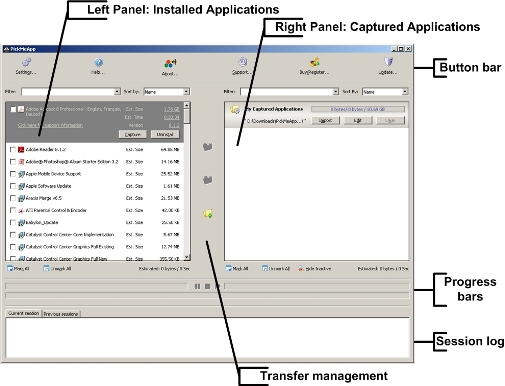
PickMeApp helps you to,
- Take backup of your installed programs and their settings.
- To move your customary programs and their settings to a new computer.
- To install an application with the same predefined settings on several computers.
- To save time on the installation of applications
You can also create personalized package of multiple applications using PickMeApp.This feature is really useful in many situations where you need to replicate same set of application environment in multiple machines.
PickMeApp also provides command line interface. You need to register to download and use PickMeApp,Each PickMeApp downloaded directly from the PickMeApp site receives an unique PickMeApp ID. Only those installations with unique PickMeApp ID can be registered, request support, receive updates.
Try PickMeApp

PC MOVER
The ONLY software that moves programs, files and settings to your new PC!
PCmover is the ONLY software that moves programs, files and settings from your old PC to your new PC – even restore from an image (or old hard drive) or perform an in-place upgrade.
The easy-to-use wizard will guide you in selecting which programs, files and settings you want on your PC. When complete, your new computer will have the personality and functionality of your old PC. And, PCmover is safe – it removes nothing from your old PC, won’t overwrite anything on your new PC, and includes an easy "Undo" feature..

specifications
- Company: Laplink Software, Inc.
- Product: PCmover Professional Edition
- Requirements: 200MB disk space, Windows 2000 and up
- Price: $59.95 (Professional Edition), $39.95 (Home Edition)
- Additional Information: Product Web site
Who’s it for?
PCmover is for anyone looking for an easier way to move their old PC configurations and user settings to a new PC. There is also an Enterprise Edition for IT departments that need features like move templates and centralized control.What problems does it solve?
Moving from one PC to another is a huge amount of hassle. It takes anywhere from a few hours to a day or two, and there is a good possibility of losing data along the way, especially for apps that bury files in nonobvious locations.Standout features
- Price: The price is great, considering the time you would spend doing this work yourself.
- Documentation: The “Quick Start” guide is great and makes it easy for even a less-savvy user to do a move.
- Options: There are a good number of different ways to perform the move (I tested over the network), including USB drives and a special transfer cable. You can specify a lot of different customizations for the transfer as well.
- Ease of use: While it is not the simplest application I have ever used, it is very easy to use considering what it does.
What’s wrong?
Errors hold the transfer up: In my testing, some minor errors needed to be acknowledged before the move could proceed, even though I had elected to be notified when it was done and thought it was in a “walk away and take a nap” mode.Competitive Products
Bottom line for business

Laplink has been in the business of connecting PCs together for transfers ever since I can remember. Their newest version of their PCmover product builds on this experience to create a great package for businesses and home users alike.
Doing a PC move is fraught with danger. I know from personal experience what can happen when you miss a critical file or setting during a move, especially an in-place upgrade. And that is really easy, when applications like Outlook and Outlook Express hide their data in unusual places! After the move has been completed, PCmover runs a startup app manager to let you choose what transferred apps from the old PC should be allowed to start at boot and login. That’s a welcome feature indeed!
PCmover covers a lot of different scenarios. As long as the new computer does not have an older OS than the original one and you have a way of getting the data over (USB, disks, cable, network, and in-place upgrades), the move can be done.
I was impressed with some of its configuration choices, like being able to omit certain users or map them to new profiles. I loved the option to send me an email when the move was complete, giving busy IT pros the ability to start a move and do something else, but not waste any time with it sitting there finished.
For larger IT organizations, Laplink offers an Enterprise Edition, which adds centralized management and the creation of templates to allow you to standardize the migrations. Even if you use PCmover only once, the $59.95 list price for the Professional Edition is a bargain compared to the value of the time it saves.


0 comments:
Post a Comment